
Find Emails in Seconds with Smart Gmail Filters
Overview
The software is a free Chrome extension designed to streamline email management within Gmail by providing instant access to preconfigured filters. It addresses the common frustration of manually searching through cluttered inboxes to locate specific messages. By integrating directly into the Gmail interface, it enables users to quickly sort and retrieve emails based on criteria such as sender, date, attachment type, and size. This tool is ideal for professionals, remote workers, and anyone managing high-volume email traffic who seeks faster access to critical correspondence.
Target users include individuals working from home, team leads coordinating projects, and administrative staff handling recurring client communications. The extension operates within the browser environment, requiring no installation beyond Chrome’s extension marketplace. It is developed by cloudHQ, a company focused on productivity enhancements for digital workflows. Real-world use cases include retrieving large files from past emails, identifying unread messages from specific contacts, or filtering communications from a particular organization using domain-based rules.
Key Features & Capabilities
- Predefined Email Filters – Instant access to commonly used filter categories including unread emails, specific senders, and domain-based filtering (e.g., @google.com).
- Attachment Type & Size Filtering – Allows users to locate emails based on the type (e.g., PDF, image) and size of attached files.
- Date-Based Sorting – Organizes emails by year, month, or exact date, enabling quick retrieval of time-specific messages.
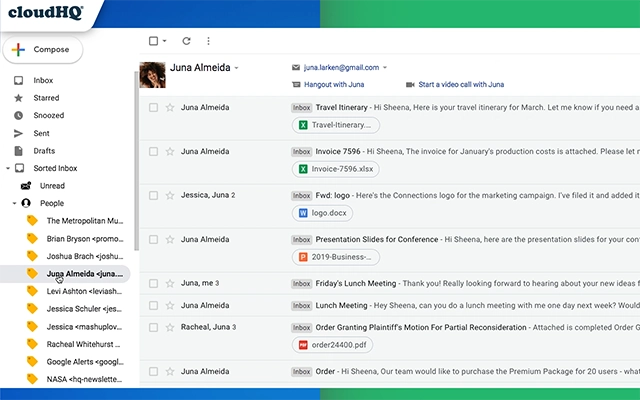
- Intuitive Label Integration – Filters are displayed directly within the Gmail label area for seamless navigation.
- Time-Saving Workflow – Reduces manual search time by automating common filtering tasks, improving daily email efficiency.
These features help users avoid repetitive searching, especially during high-pressure periods or remote work scenarios. For example, a project manager can instantly retrieve all large PDF attachments from last month’s client communications, while an HR professional can quickly identify all unread messages from a specific department.
User Interface, Workflow & Performance
The user interface is minimal and integrated directly into the Gmail sidebar, leveraging the existing label structure for navigation. Users can access filters with a single click, minimizing disruptions to their workflow. The design prioritizes clarity and simplicity, ensuring that even non-technical users can navigate the tool without training.
Workflow efficiency is enhanced by the direct placement of filters within the Gmail interface, eliminating the need to open separate menus or use complex search operators. The extension runs in the background without requiring constant user input, reducing cognitive load during email processing.
The developer did not specify resource usage details. Performance observations are based on general software behavior patterns. The extension is lightweight at 1.2 MB, suggesting low memory footprint and minimal impact on browser performance. Stability is expected to be consistent with standard Chrome extensions, though actual behavior may vary depending on the user’s system and browser configuration.
Compatibility & System Requirements
The software is compatible with Windows, Mac, and Linux operating systems, as it functions as a Chrome extension. It operates within the Google Chrome browser environment, requiring no native installation on the host machine. The extension size is 1.2 MB, indicating a lightweight deployment.
Exact system requirements were not listed. Compatibility information was partially provided. Users should ensure they are running a supported version of Chrome. The extension is designed for use with Gmail, so it does not function outside the web-based email environment.
Pros and Cons
Pros
- Free to use with no hidden costs
- Direct integration with Gmail for seamless access
- Preconfigured filters save time on manual setup
- Lightweight at only 1.2 MB
- Supports multiple operating systems: Windows, Mac, Linux
Cons
- Requires Google Chrome to function
- Limited to Gmail email management
- No offline functionality
- Dependent on browser stability and updates
- Features are fixed; no customization of filter logic
Is this extension compatible with all browsers?
The extension is designed exclusively for Google Chrome. It does not support other browsers such as Firefox, Edge, or Safari.
Can I use this tool offline?
No, the extension requires an active internet connection and access to Gmail. It cannot function when offline.
Is the software safe to install?
Yes, the extension is published through the Chrome Web Store and developed by cloudHQ, a known provider of productivity tools. It does not collect personal data beyond what is necessary for functionality.
How often are updates released?
Update frequency is not specified. Users should ensure their Chrome browser is up to date to receive the latest version.
What type of license does this software use?
The software is free to use under a permissive license. No purchase or subscription is required.
Final Thoughts
This free Chrome extension delivers a focused solution for users struggling with email overload in Gmail. Its preconfigured filters offer immediate value, especially for professionals managing frequent communication across teams or clients. The integration with Gmail’s interface ensures minimal disruption and a smooth user experience. While it lacks advanced customization, its simplicity and lightweight design make it a reliable tool for daily productivity.
For anyone using Gmail regularly—particularly those working remotely or managing high email volumes—this tool provides a meaningful efficiency boost. The lack of cost and broad OS support further enhance its appeal.
Download Find Emails in Seconds with Smart Gmail Filters now







